
Unlock 1,200+ hidden macOS settings and run maintenance tool...
35% OFF
From
$19.47$29.95
SAVE $10.48
Offer Expired
This special offer has ended. Get notified when similar deals become available.
Unlock 1,200+ hidden macOS settings and run maintenance tool...
Grab text from anywhere on screen — images, video, PDFs, scr...
Shrink oversized PDFs without visible quality loss. Drag, dr...
AppVault snapshots your setup, updates apps, secures keys, a...
Turn any website into a real Mac app — its own icon, its own window, out of the browser for good.
This deal is no longer available.
Unite Pro turns the websites you rely on into focused, customizable Mac apps. Email, chat, planning tools, AI, and media each run isolated, stay fast, and integrate with macOS in ways browsers can’t. No Electron, no wrappers, no compromises — just your favorite tools behaving like actual Mac apps.
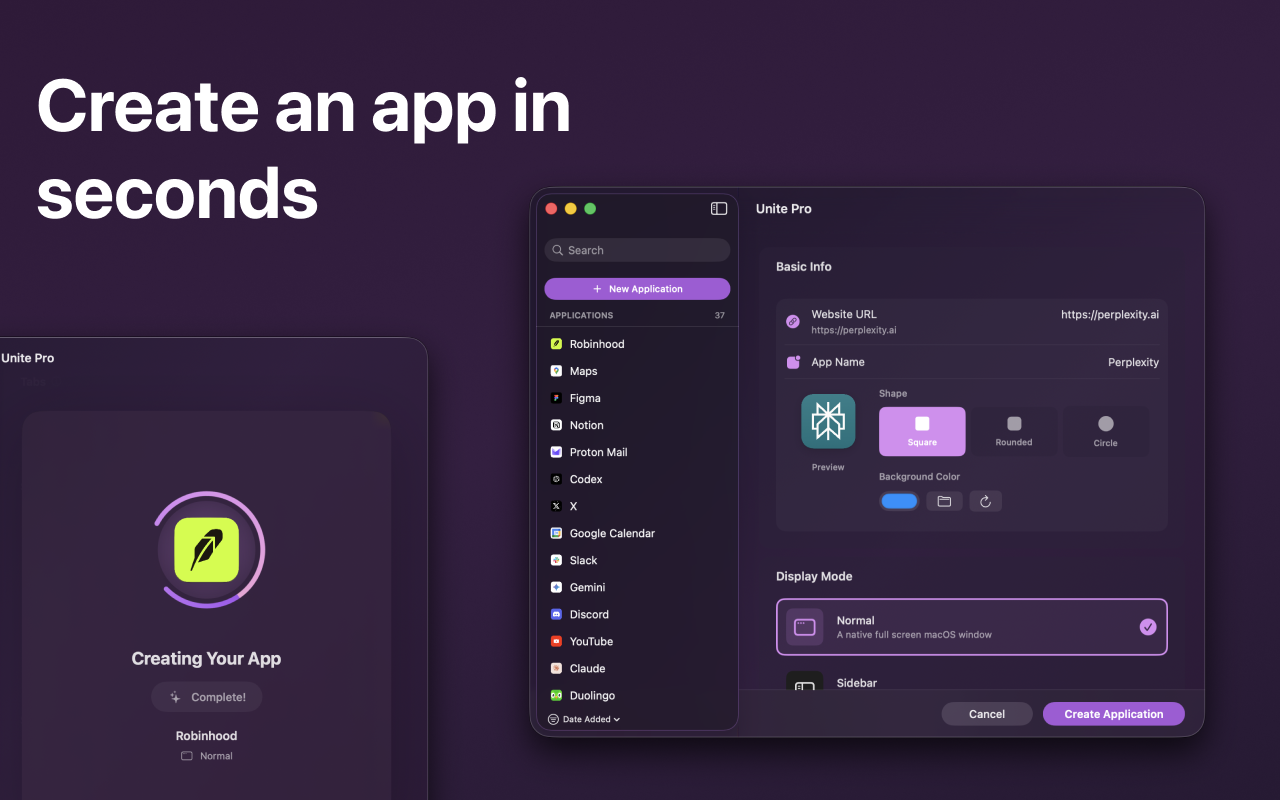
Create an app in seconds
A redesigned creation tool makes turning a website into a Mac app easy for anyone. Type a name or paste a URL, and Unite Pro intelligently fills in the app name, icon, URL, and recommended settings — or dive deeper to configure everything yourself. A redesigned icon picker uses high-quality favicons to create elegant macOS icons, built-in suggestions surface smart defaults for popular services, and saved defaults let you spin up multiple apps without reconfiguring each time.
One app, three ways to work
Every Unite Pro app can instantly switch between three modes:
Normal apps — a clean, distraction-free, Mac-native window that puts your content first.
Menu bar apps — lightweight and instantly accessible, with optional auto-refresh on each reveal.
Sidebar apps — a resizable sidebar that keeps chat, task trackers, and key tools alongside your main work.
Make every website work the way you do
Fine-tune how each app looks and behaves — smart toolbars, title bars, window chrome, and system controls stay clean and consistent. Intelligent link routing sends links to the right destination and handles sign-in flows automatically. Strip away distractions, adjust layout and appearance, or go deeper with custom user scripts and styles. A built-in ad blocker cuts clutter without third-party extensions, and a zoom manager keeps content easy to read per site.
Native behavior beyond the browser
Site Enhancements add real macOS capabilities to select services:
AI menu bar companions — reach ChatGPT, Claude, Gemini, or Grok through a floating overlay anywhere in macOS.
Meeting notifications — system-wide alerts from Google Calendar and Outlook with one-click access to calls.
Dock badges — spot new messages, tasks, and updates at a glance.
Video speed controls — adjust playback speed on most video sites with keyboard shortcuts or on-screen controls.
Thoughtfully built, everywhere it matters
A built-in password manager adds a dedicated management view, stronger password generation, notes, and easy import/export. A shortcut manager lets you search and rebind virtually every keyboard shortcut to match your muscle memory. Full data isolation — including Incognito tabs — keeps each app private and predictable.
Built for macOS 26 Tahoe
An all-new interface designed for macOS Tahoe brings refined system materials, beautiful light and dark mode, automatic color adaptation, and performance optimized for Apple Silicon. Now localized in Spanish, French, German, Simplified Chinese, Hebrew, and Japanese, with per-site location access and automatic dark mode for light-only websites.
Requires macOS 15 or greater. Buy once and use forever, with optional paid upgrades.
Common questions about this deal
Unite Pro on BundleHunt includes a license key and instant download access. The license is obtained directly from the developer and activates the latest version of the software.
After purchasing Unite Pro through BundleHunt, your license key and download link will be available immediately in your account under "Downloads & Licenses". You can access them anytime.
You will receive the developer's most up-to-date version of Unite Pro, fully activated and ready for immediate use.