Become a master of file management with Path Finder 10
Save your time: compare and synchronize folders, view hidden files, use Dual Pane and full keyboard navigation to browse your file system
Work how you want! Extreme customization allows you to access most tools in many different ways to suit your workflow.
Essential Tools
- Collect files with Drop Stack, then copy or move them in a single step.
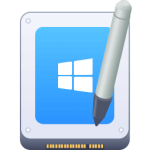
- Work with your files side-by-side in a customizable Dual Pane View.
- View and manipulate hidden files.
TOP FEATURES:
- AirDrop integration
Send files to your other devices or friends (currently only for devices discoverable by "Everyone")
- Native support for Apple Silicon
Runs fast and smooth on the latest and greatest Macs.
- Share Menu
Click on a file and share it to AirDrop, Messages, Mail, Notes, etc.
- Browse your iPhone
Browse files and perform file operations on your USB connected iOS devices
- Redesigned for Big Sur
The code has be polished and supercharged to fly on Big Sur.
- Dropbox integration:
Full Dropbox integration. Just link your account and you're all set up.
- Modules everywhere
Fully customize your browser window with our new simple drag and drop module system.
- FolderSync
FolderSync is Cocoatech's Folder Comparison and Synchronization tool. And it's powerful.
- Folder Merging
Merge contents of two folders when copying/moving instead of overwriting.
- Arranging and Grouping items:
Arrange files in a group based on a specific file attribute.
- Editable Path Navigator
Directly type in the Path Navigator to get to your files quickly.
- One-Click Dual Pane Copy
Use Path Finder's intuitive dual-pane browser to copy files from one pane to the next, with just a single click.
- Secure Delete
Secure delete using 1, 7 or 35 passes on any volume type..
- File Transfer Queue
Access current file operations from either a toolbar item or a separate unified window..
- ACL Editor
Create and modify Access Control Lists, an advanced alternative to macOS's standard Unix permissions..
- Calculate File Checksums
MD2, MD4, MD5, SHA-1, SHA224, SHA-256, SHA384, SHA-512..
- File Tagging
Leverage the power of OpenMeta to tag your files and share tags between apps..
- Batch Renaming
Apply filename changes to a group of files simultaneously..
- Hex Editor
Low-level file editing without ever leaving your browser..
- Drop Stack
Freeze drag-and-drop operations by placing files into a temporary stack..
- Dual-pane Browser
View the contents of two folders side-by-side in one window..
- Tabs & Bookmarks
Bring your web browser workflow into your file browser..
- Low-level Search
Search using Spotlight's database just like the Finder, or do a low-level scan for your files..
- File List Filtering
Quickly filter a list of files by name, extension, or kind..
- Smart Sorting
Sort by folders, packages, or files first..
- Advanced Selection
Select files based on file name, extension, attributes, and more..
- Keyboard Access
Change Path Finder's default shortcuts or add your own..
- Quick Look & Cover Flow
Quickly preview files, and display Cover Flow alongside any other view type..
- Integrated Terminal
Embed a terminal window directly into your graphical file browser window..
- Command Line Tools
Execute common command line tools directly from the Path Finder GUI..
- Source Control
Run common Git and Subversion commands without the command line..
- Application Launcher
Access your apps with the press of a key..
- Archives
Work with a variety of archive types including zip, gzip, dmg, sit, and more..
- Text & Image Editors
Create and edit text. Crop and scale your images..