
Unlock over a thousand hidden macOS settings and run one-cli...
35% OFF
From
$19.47$29.95
SAVE $10.48
Offer Expired
This special offer has ended. Get notified when similar deals become available.
Unlock over a thousand hidden macOS settings and run one-cli...
Grab text from anywhere on screen — images, video, PDFs, scr...
Shrink oversized PDFs without visible quality loss. Drag, dr...
AppVault snapshots your setup, updates apps, secures keys, a...
Makes Internet Connections Visible!
This deal is no longer available.
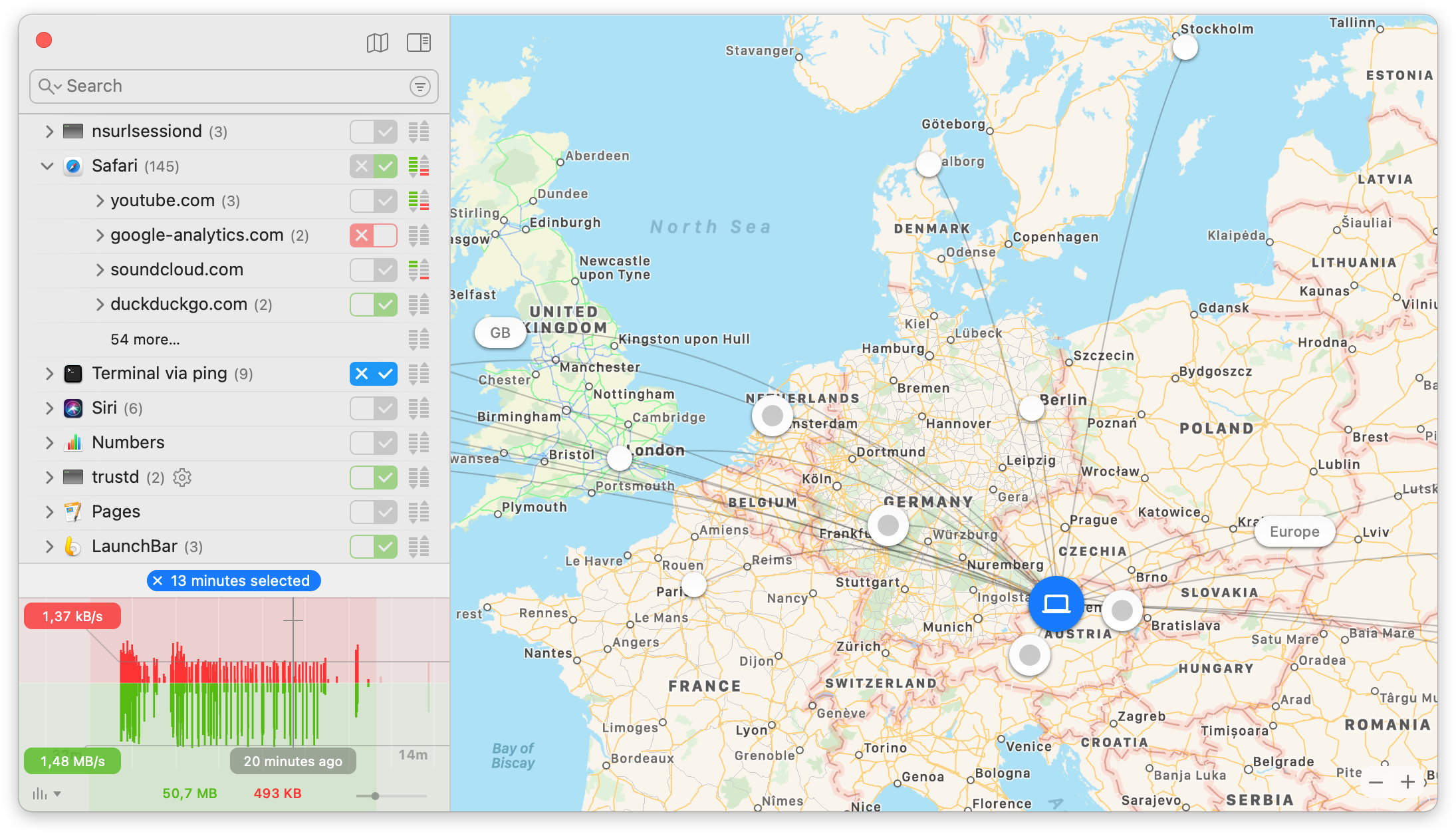
As soon as you’re connected to the Internet, applications can potentially send whatever they want to wherever they want. Most often they do this to your benefit. But sometimes, like in the case of tracking software, trojans, or other malware, they don’t.
But you don’t notice anything, because all of this happens invisibly under the hood.
makes these Internet connections visible and puts you back in control!
Decide immediately
Whenever an app attempts to connect to a server on the Internet, Little Snitch shows a connection alert, allowing you to decide whether to allow or deny the connection. No data is transmitted without your consent. Your decision will be remembered and applied automatically in the future.
Review later
If you are new to Little Snitch, you may get overwhelmed by the vast amount of notifications from applications wanting to connect to the Internet. The all-new Silent Mode was re-built from the ground up to make dealing with them a breeze. It lets you silence all notifications for a while, and make all your decisions later, conveniently with just a few clicks, in one go.
Network Monitor is your window to the world of network connections. View your Mac’s network activity from three perspectives – a list of apps and servers, a web of connections across the globe and a one hour history of data traffic.
Ever wanted to know, where in the world your data is sent to? Network Monitor shows the location of all servers your Mac is connected to on an interactive world map. Animated connection lines provide a clear overview of currently transferred data and blocked connections.
Benefit from the community’s expertise: Subscribe to rule groups from other users and prevent your Mac from connecting to selected ad servers, phishing servers, trackers, etc.
Protecting your privacy has never been easier.
Drag and Drop Installation
Install Little Snitch simply via Drag and Drop. No restart of the computer required.
Improved Monitoring
Connection information for up to one year is now captured efficiently in the background, allowing in-depth analysis of past network activity.
Common questions about this deal
Little Snitch 5 on BundleHunt includes a license key and instant download access. The license is obtained directly from the developer and activates the latest version of the software.
After purchasing Little Snitch 5 through BundleHunt, your license key and download link will be available immediately in your account under "Downloads & Licenses". You can access them anytime.
You will receive the developer's most up-to-date version of Little Snitch 5, fully activated and ready for immediate use.