Unlock 1,200+ hidden macOS settings and run maintenance tool...
35% OFF
From
$19.47$29.95
SAVE $10.48
Offer Expired
This special offer has ended. Get notified when similar deals become available.
Unlock 1,200+ hidden macOS settings and run maintenance tool...
Grab text from anywhere on screen — images, video, PDFs, scr...
Shrink oversized PDFs without visible quality loss. Drag, dr...
AppVault snapshots your setup, updates apps, secures keys, a...
Upload files with email notifications
This deal is no longer available.
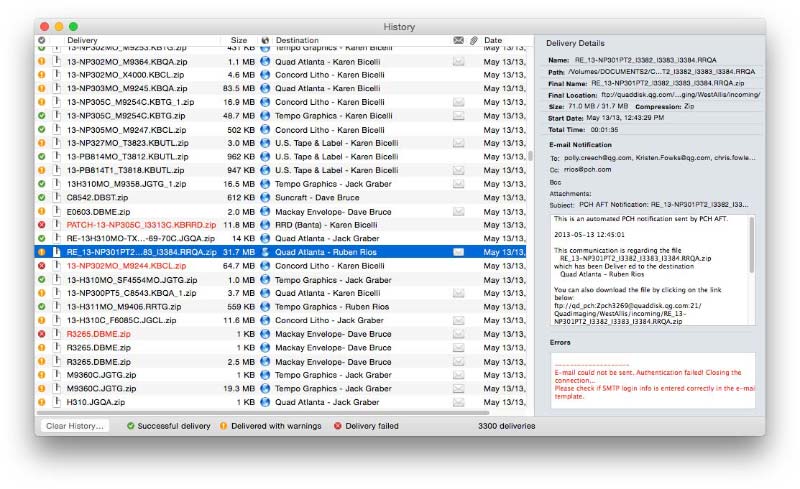
FTP, SFTP, S3 and other servers • Automatic email notifications • Hot folders • Encryption and more.
Send files to remote and local destinations automatically with email notifications
Deliver Express offers automatic email notifications, hot folders, delivery to multiple destinations, support for major online services, detailed history and much more
Create watched hot folders for your destinations, drop your files there – and they will be sent automatically. This option only available in Deliver Express which can run absolutely unattended and serve unlimited users on a network.
Deliver Express solves the problem of notifying recipients about file uploads. Once the file is transferred, Deliver will send an email automatically so you don’t need to lift a finger and babysit your deliveries. Your recipients can download files automatically from a link in the email.
...or copy download link
If you prefer to notify your recipients manually, you can just copy the file download link and include it in your email.
The emails are based on powerful variable templates. Include variable data such as file name, destination, server location, hyperlink to your file or its enclosing folder, and more.
If you send a PDF file, Deliver can create its lo-res RGB version on the fly and attach it to the notification email as an instant preview for your recipients.
Files and folders can be compressed in either .zip or .dmg format. Disk images can be automatically encrypted with a password.
Common questions about this deal
Deliver Express on BundleHunt includes a license key and instant download access. The license is obtained directly from the developer and activates the latest version of the software.
After purchasing Deliver Express through BundleHunt, your license key and download link will be available immediately in your account under "Downloads & Licenses". You can access them anytime.
You will receive the developer's most up-to-date version of Deliver Express, fully activated and ready for immediate use.