

Cue writes with you in every Mac app: suggestions as you type, quiet proofreading, a panel for your mail, and replies that sound like you.
- Official License
- Instant Delivery
- 3 Macs
- Secure Checkout

Cue
Apps by Mo·v2.3.0
- Official license · Direct from developer
- Instant Download Access
- 3 Macs
- Secure Checkout
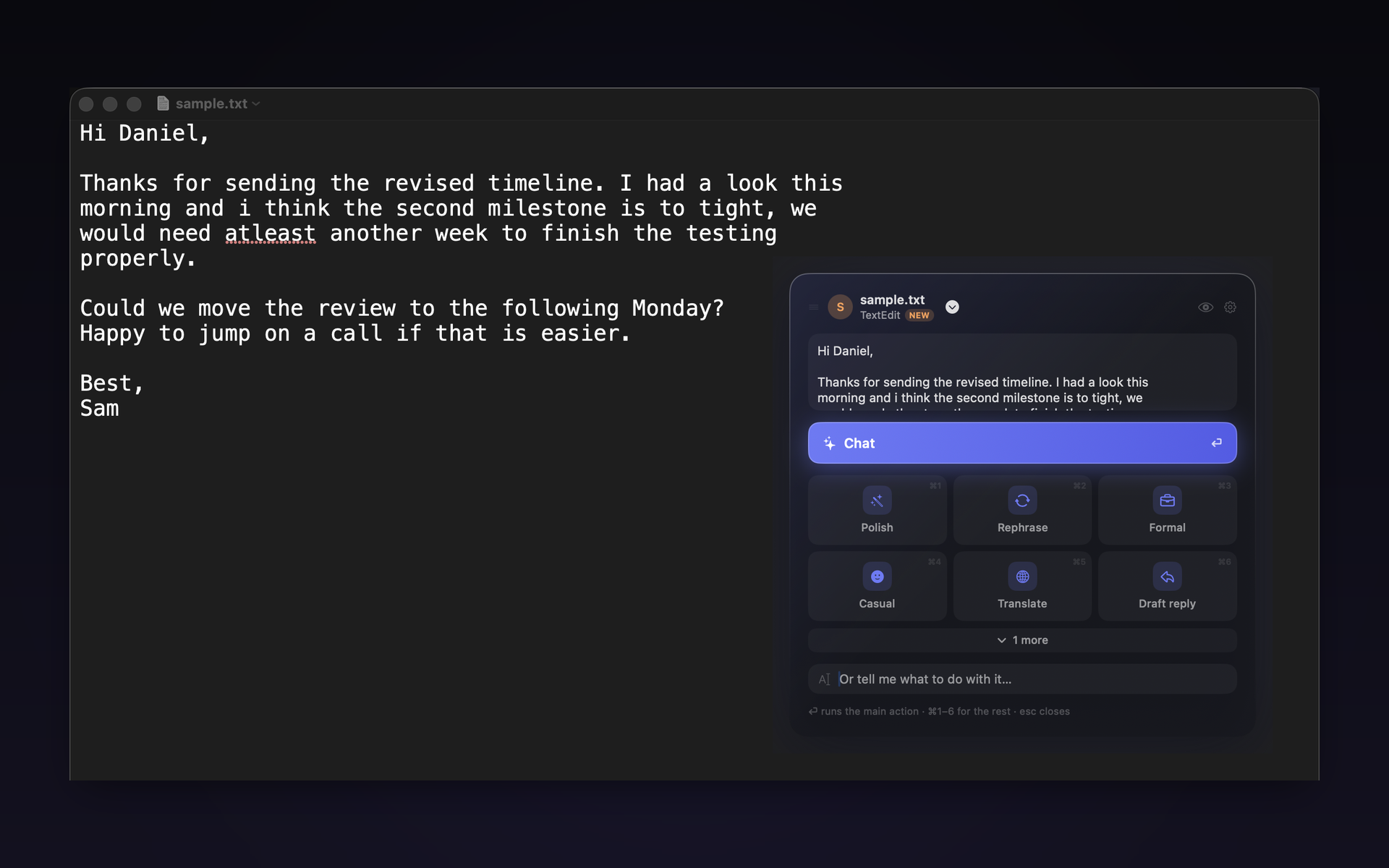
Cue is a writing companion that lives in every app on your Mac. It is not a window you paste text into. It works where you already type.
Suggestions as you type
Cue finishes your sentence in grey text at your cursor, in the field's own font. Take it with Tab, a word at a time or all at once, or keep typing and it disappears.
Proofreading
Stop typing and Cue checks what you wrote, marking real mistakes in red and clumsy phrasing in blue, right where they are. One keypress fixes one, or hold that key to fix everything in a single edit that leaves your spacing, line breaks and bullets exactly as they were.
Actions
Select text, press a key, and a panel offers your own actions: polish this, make it formal, shorten it, translate it, reply to this. You write the actions, so they are the ones you actually use.
Let it see the screen
Open the eye in the panel and the model sees the window you are working in, for that one action only. Ask about a photo someone sent you, or a screenshot, and get an answer that is actually about it.
Busy status
Click the moon and every reply Cue writes says you will come back to them later, in your own words. It stays on until you clear it, because being busy lasts longer than one message.
Memory
Cue remembers the people you write to and the things you tell it, so a reply sounds like you talking to that person rather than a chatbot talking to anyone. Everything it learns is stored on your Mac, filed by topic, and you can read, edit or delete any of it in the memory browser.
Mail
Sign in to your work account and Cue keeps a private, read only copy of your recent mail on your Mac. Press one shortcut on the message you are reading and Cue opens with the thread it belongs to, a draft written from it, and the tone you want it in. Choose which account it goes out from, turn your signature on or off, and mark yourself away without writing that sentence. Nothing on the mail server is ever changed or deleted.
Voice
Hold one key, speak, and what you said lands in the field you are typing in, polished if you want it polished. The speech engine runs on your Mac.
A second language
Pick a second language in settings and selecting text in it gives you that language's own set of actions. Arabic is corrected as you type, with hamza and taa marbuta put right in place, and Arabic typed in Latin letters comes back as Arabic.
Your key, or no key at all
Use your own Claude, GPT or Gemini key, or download a model and run it entirely inside Cue, in which case nothing you write ever leaves your Mac. You choose which model does which job. Mail you mark sensitive is only ever shown to a model running on your own machine.
Built for macOS
Written for the Mac, not ported to it. It works in Mail, Messages, WhatsApp, Slack, Notes, Outlook, browsers, and anywhere else you type.







What You Can Do
2 use cases for Cue
Frequently Asked Questions
Common questions about this deal
01What's included with Cue on BundleHunt?
Cue on BundleHunt includes a license key and instant download access. The license is obtained directly from the developer and activates the latest version of the software.
02How do I get my Cue license key?
After purchasing Cue through BundleHunt, your license key and download link will be available immediately in your account under "Downloads & Licenses". You can access them anytime.
03What version of Cue will I receive?
You will receive the developer's most up-to-date version of Cue, fully activated and ready for immediate use.
