Offer Expired

CollageItDeal No Longer Available

This special offer has ended. Get notified when similar deals become available.

Active Deals You Might Like

View All Deals
SAVE 35% • Was $29.95

Unlock over a thousand hidden macOS settings and run one-cli...

35% OFF
From
$19.47$29.95
SAVE $10.48
SAVE 25% • Was $7.99

Grab text from anywhere on screen — images, video, PDFs, scr...

25% OFF
From
$5.99$7.99
SAVE $2.00
SAVE 30% • Was $19.99

Shrink oversized PDFs without visible quality loss. Drag, dr...

30% OFF
From
$13.99$19.99
SAVE $6.00
SPECIAL OFFER

Draft description

From
$29.99
HOT DEAL • 95% OFF

100% Safe and Easy-to-use NTFS for Mac Tool

From
$2.50$49.95
SAVE $47.45
CollageIt

CollageIt

PearlMountainv3.6.0macOSPhoto Editing

Create eye-catching photo collages on Mac OS X.

$3.50
$29.90
88% OFF
Deal Ended

This deal is no longer available.

CollageIt
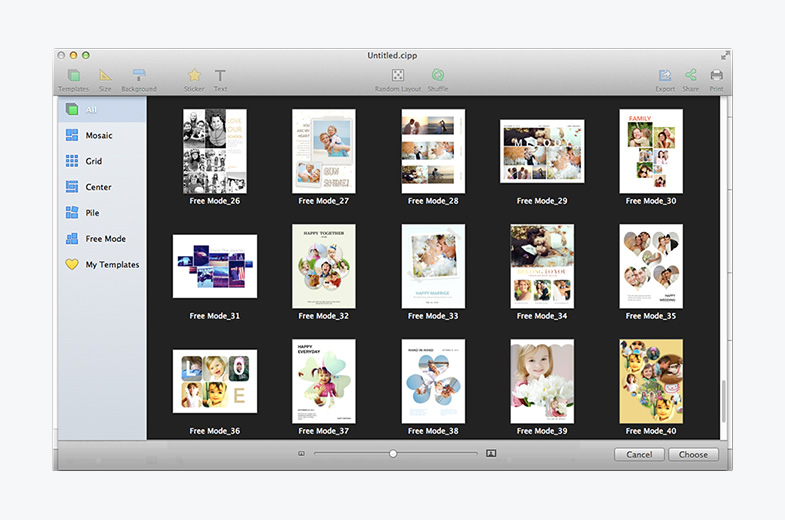
CollageIt Screenshot 1
CollageIt

CollageIt

PearlMountain·v3.6.0

$3.50$29.9088% OFFEnded
  • Share

An easy-to-use and automatic collage maker.

that helps you create eye-catching photo collages on Mac OS X with just a few clicks.

An Automatic, Easy and Powerful Collage Maker for Mac

  • With only three steps, you’ll create photo collage automatically; easy enough for users of all experienced levels.
  • Five collage styles for making photo collage - Mosaic, Grid, Center, Pile and Free Mode.
  • Various collage layouts can be generated continuously.
  • Intelligently fit photos to collage with face recognition when generating layout.
  • Real-time preview with a super high speed.
  • Large photo capacity supports adding up to 200 photos.

Make an Amazing Photo Collage with Abundant Resources and Effects

  • 60+ brand new templates to make various style of photo collages on Mac.
  • Apply photo effects/filters, collage frames& masks to beautify your photo collage.
  • Add and customize text in real time to make your collage standout.
  • Add stickers and resize, rotate, flip, etc. at will.
  • Choose from 50+ background patterns, or load your own image as background tosuit your collage.
  • Apply photo border and shadow for decoration.

Customize Photo Collage on Mac in Your Way

  • Add photos directly from iPhoto.
  • Arrange photos in order under Grid mode.
  • Switch to Free Mode to move, resize, and rotate each photo manually.
  • Crop/uncrop photos to meet all your needs.
  • Support selecting multiple objects and editing them at a time.
  • Set the margin of Top, Bottom, Left, and Right respectively.

Share Your Custom Photo Collage Anywhere

  • Save the collage as JPEG, TIFF, BMP, PNG, or GIF, etc. image format and print it out.
  • Set the collage as desktop image.
  • Save the collage as a PDF file.
  • Share the collagedirectly on Facebook or via E-mail, iMessage, AirDrop, Twitter, and Flickr with family and friends.
  • Save the collage as project and open it for further editing.

Frequently Asked Questions

Common questions about this deal

01What's included with CollageIt on BundleHunt?

CollageIt on BundleHunt includes a license key and instant download access. The license is obtained directly from the developer and activates the latest version of the software.

02How do I get my CollageIt license key?

After purchasing CollageIt through BundleHunt, your license key and download link will be available immediately in your account under "Downloads & Licenses". You can access them anytime.

03What version of CollageIt will I receive?

You will receive the developer's most up-to-date version of CollageIt, fully activated and ready for immediate use.