Unlock 1,200+ hidden macOS settings and run maintenance tool...
35% OFF
From
$19.47$29.95
SAVE $10.48
Offer Expired
This special offer has ended. Get notified when similar deals become available.
Unlock 1,200+ hidden macOS settings and run maintenance tool...
Grab text from anywhere on screen — images, video, PDFs, scr...
Shrink oversized PDFs without visible quality loss. Drag, dr...
AppVault snapshots your setup, updates apps, secures keys, a...
Powerful calendar app with multiple syncing options.
This deal is no longer available.
It's packed with time-saving features and compatible with all leading cloud services including Reminders, iCloud, Google, Exchange, Office 365, Yahoo, Fastmail, Fruux, Kerio, Zoom and more.
BusyCal also supports Wireless-LAN sync for those that do not wish to use a cloud service. Share your offline calendars at work or at home over wifi.
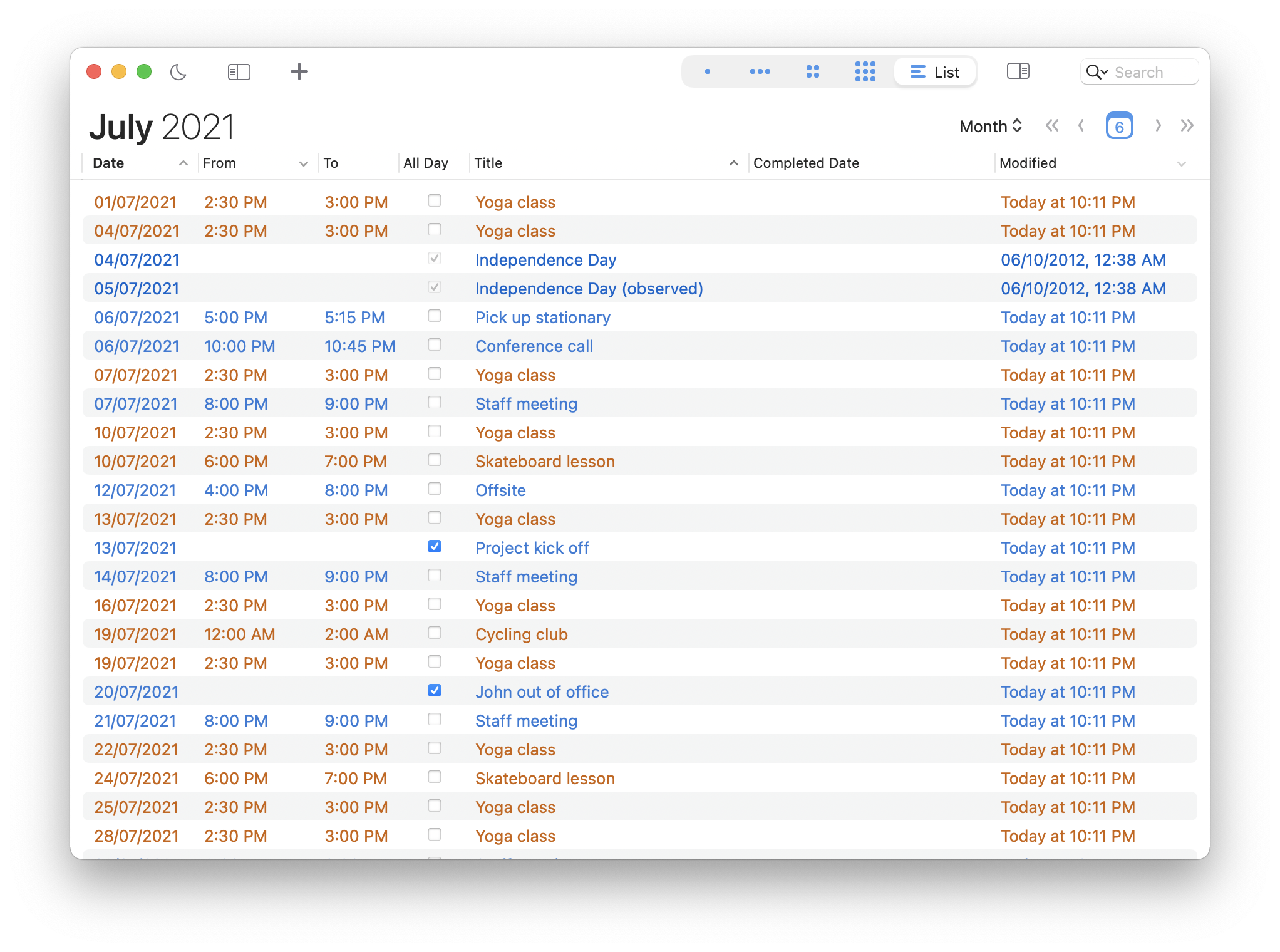
BusyCal displays your calendar in Day, Week, Month, Year and List views.
What makes BusyCal unique is its ability to customize these views to more precisely meet your needs.
You can choose the number of weeks shown in the Month view and the number of days shown in Week view and even customize the calendar's appearance by choosing a font face and size, calendar colors, time format and more.
One of BusyCal's most popular features is its embedded info panel that appears in the sidebar, enabling you to quickly view and edit event details with speed and precision.
The Info Panel has been completely redesigned in BusyCal and boasts a cleaner, modern look with improved controls for selecting dates and times, adding locations, attendees and more.
What's more, the info panel is completely customizable. You can choose to show just the basics, or additional fields like time zones, tags and graphics.
BusyCal also supports showing the Info Panel as a floating window, or a pop-over.
In BusyCal, Tasks are integrated into your calendar, display on the date they are due, and carry forward until completed. And we've added support for Timed Tasks that occur at a specific time of day and appear inline with your calendar events.
You can also display a Task List in the right sidebar, sorted by date, priority, calendar, title, tag, or manually. And Tasks in BusyCal are compatible and sync with the Reminders app on macOS 10.14 and iOS 12 and below.
BusyCal add support for travel time, one of our most requested features. Travel time allows you to block out time for travel to an event or location.
You can set a fixed amount of travel time or determine it automatically using the integrated support for Location Services and Apple Maps. You can even receive alerts when it's time to leave as traffic conditions change.
The totally redesigned menu bar app now displays a navigable mini-month calendar with colored dots and bars that provide a visual density map of your availability.
A scrolling list of your events and tasks are displayed in the menu along with a 8-day weather forecast.
You can click on an event in the menu bar to view its details, and create new events and tasks using natural language.
And, unlike other calendar apps, BusyCal's menu bar app is always running, even when the main BusyCal app is not running, so you always have access to your schedule.
BusyCal enables you to create events and tasks using natural language. A preview of the event details are displayed while you type as it recognizes the title, date and time, location and more.
You can even use it to add contacts or attendees, set an alarm, add a URL, or to indicate the calendar to create the event on.
BusyCal displays a list of your calendars (along with an optional mini month) in the left sidebar.
You can rearrange the list of calendars and use it to show, hide, and share calendars. You can also rename calendars, change calendar colors, or arrange related calendars into collapsible groups. The Calendar List can be shown or hidden as needed.
BusyCal's Smart Filters are a powerful tool for filtering and formatting your calendar.
The most common use of Smart Filters is for creating Calendar Sets, to quickly toggle multiple calendars on or off with a single click (see above).
You can also use Smart Filters to create saved searches (e.g. events that contain 'Joe'), or for remembering view settings (e.g. displaying an 8-week month view with weekends hidden), all of which you can be accessed with a keyboard shortcut or a button on the toolbar.
BusyCal displays alarms in a movable, resizable floating window that offers the ability to snooze alarms for any number of minutes, hours or days. You can even snooze an alarm until a few minutes before the start of an event, and snooze multiple alarms at once.
And, unlike other calendar apps, BusyCal Alarms trigger even when the main BusyCal app isn't running, so you'll never miss an important appointment, meeting, or event.
Common questions about this deal
BusyCal on BundleHunt includes a license key and instant download access. The license is obtained directly from the developer and activates the latest version of the software.
After purchasing BusyCal through BundleHunt, your license key and download link will be available immediately in your account under "Downloads & Licenses". You can access them anytime.
You will receive the developer's most up-to-date version of BusyCal, fully activated and ready for immediate use.