Unlock 1,200+ hidden macOS settings and run maintenance tool...
35% OFF
From
$19.47$29.95
SAVE $10.48
Offer Expired
This special offer has ended. Get notified when similar deals become available.
Unlock 1,200+ hidden macOS settings and run maintenance tool...
Grab text from anywhere on screen — images, video, PDFs, scr...
Shrink oversized PDFs without visible quality loss. Drag, dr...
AppVault snapshots your setup, updates apps, secures keys, a...
Track all of your devices' batteries from one place
This deal is no longer available.
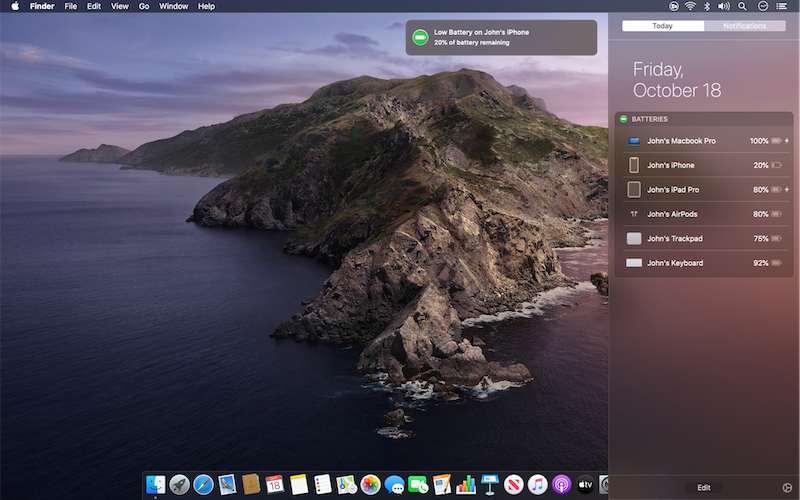
Track all of your devices' batteries from one place.
Batteries for Mac allows you to track all of your devices' batteries from the "Batteries" widget in the Today View (Notification Center).
When any of your devices are running low on battery, you'll be notified to remember to recharge it.
Batteries Widget for Mac is similarly simple. It adds a panel to the Mac’s Notification/Today sidebar, with all your nearby devices listed. It’s just like the one on iOS, except it’s on the Mac. AirPods and Magic Trackpads just appear, but you’ll have to do a little but of setup for iOS devices.
The app uses the Mac’s built-in iTunes sync framework to connect to your iPhone, etc. To make it work, you just have to enable wireless iTunes sync in iTunes. On macOS Catalina, this setting is now found in the Finder.
It’s set-and-forget, so once you’ve hooked up the iTunes Wi-Fi sync (or the Catalina equivalent), it just works. (Plus, you don’t need to keep iTunes running for it work.)
Finally, if the battery level of one of those connected devices drops too low, the Batteries Widget gives you a standard macOS notification to warn you. Then you can throw your iPhone onto its Qi charger.
Common questions about this deal
Batteries on BundleHunt includes a license key and instant download access. The license is obtained directly from the developer and activates the latest version of the software.
After purchasing Batteries through BundleHunt, your license key and download link will be available immediately in your account under "Downloads & Licenses". You can access them anytime.
You will receive the developer's most up-to-date version of Batteries, fully activated and ready for immediate use.