The ultimate media toolkit; disc burning, video conversion and more.
This complete digital media management suite with industry-leading burning tools makes it simple to work with your media.
Makes it easier than ever to burn, copy, capture, edit, convert, and share digital media.
- Burn, author, copy, and secure CDs, DVDs, and USBs.
- Personalize discs with customizable menus.
- Convert media to popular digital formats.
- Full digital media suite including screen recording, photo art, audio editing, and more.
The preferred CD & DVD burner for Mac
This complete digital media management suite with industry-leading burning tools makes it simple to work with your media.
Optimized for macOS Big Sur
Toast is fully compatible with M1 machines and the latest macOS. Toast 19 supports macOS Big Sur 11.0, macOS Catalina 10.15, and macOS Mojave 10.14 (64 bit).
What’s New in Toast 20?
- NEW User Interface:
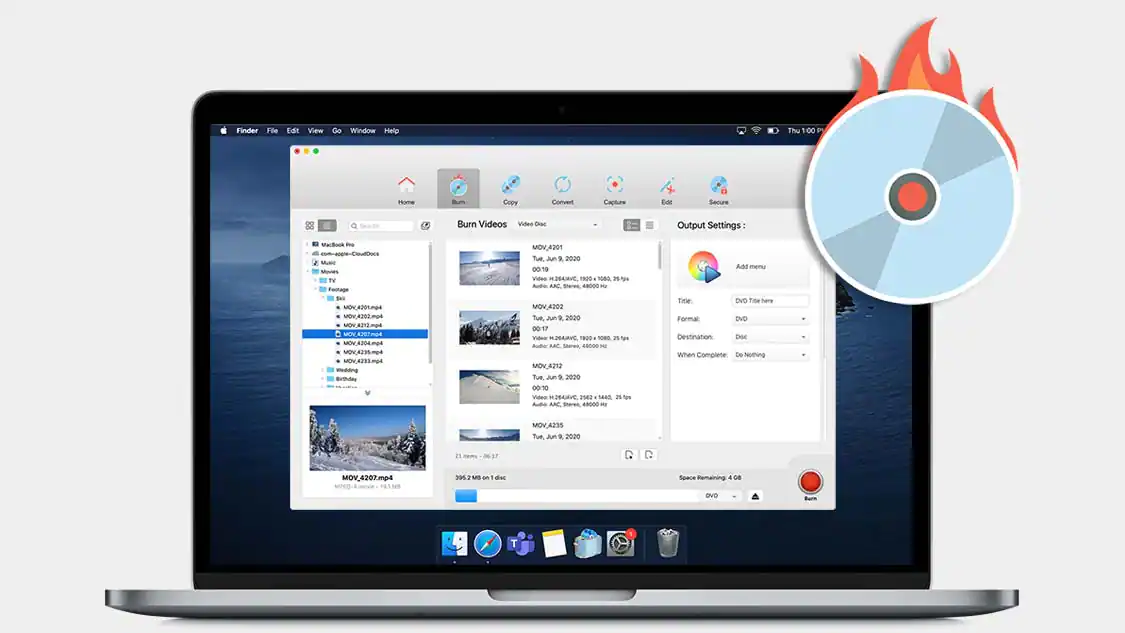
Experience a new interface designed to deliver more intuitive workflow navigation, improved file browsing, and a new customizable quick access panel.
- NEW Dark Mode:
Work in your preferred aesthetic with Dark Mode support that can automatically detect and match your chosen display preferences.
- NEW Audio Editing Tools:
Enhance your audio files, reduce distracting background noise, adjust the pitch and duration of clips, and get creative with audio effects.
- NEW Workflow efficiencies:
The updated media browser makes it simpler than ever to find, preview, and drag and drop files to your projects.
- NEW Searchable help guide:
The searchable help guide makes learning or understanding any workflow more intuitive and flexible than ever.
Features fueling this digital media management suite
- Burn:
Burn your photos, videos, audio and data files to CD and DVD* with intuitive drag-and-drop controls. Plus, author DVDs with customizable menus, chapters, and music!
- Copy:
Copy* CDs and DVDs in just a few clicks. Copy discs to distribute your latest audio mix, or create backups of your most important files. Even recover files from damaged discs!
- Convert:
Convert your media files to popular formats with ease. Convert* DVDs to digital, rip* audio CDs to digital, even restore and convert audio and video from LPs, tapes, and older devices!
- Capture:
Capture video and audio from virtually anywhere! Explore tools to record your screen, capture webcam video, and record voiceover simultaneously —perfect for creating tutorial or gaming videos!
- Edit
Edit your photos, videos and audio files before burning to disc or sharing online! Trim video clips, enhance audio recordings, and stylize or transform images* into artwork with AI-powered tools.
- Secure
Secure your information with banking-level encryption that sets the standard for the industry. Password-protect your private data on disc or USB and enjoy complete peace of mind.
* Does not copy or convert copy-protected files
Create personalized discs with custom menus and chapters
Turn the growing collection of videos on your laptop, cell phone, or external hard drive into a full home movie menu production. Select from one of 20+ themed templates*, easily drag and drop your footage, then customize with submenus, chapter points, text, and more.
Backup, recover, and secure important information to disc
Toast delivers more than just industry-leading burning tools – it delivers peace of mind. Back up your important information to disc, recover files from damaged discs, and securely password protect information on a disc or USB.
Import and convert media from almost anywhere
Toast gives you the tools to capture footage right from your screen, a portable device, or the web. Plus, download* and rip content, extract and edit clips from home DVDs, and even make quick edits and trim video clips.
Supported Input Formats:
- Audio: AAC, AIFF, MP3, WAV, M4A, OGG, FLAC and Dolby Digital AC-3
- Video: AVCHD, AVCHD Lite, DV,, MJPEG, MOV, MPEG-1/2/4, VOB, VIDEO_TS folder
- Photo: BMP, GIF, JPG, PDF, PSD, PNG, TIFF
- Disc Images: ISO, BIN/CUE, IMG, DMG, CDR, NRG