Loading...

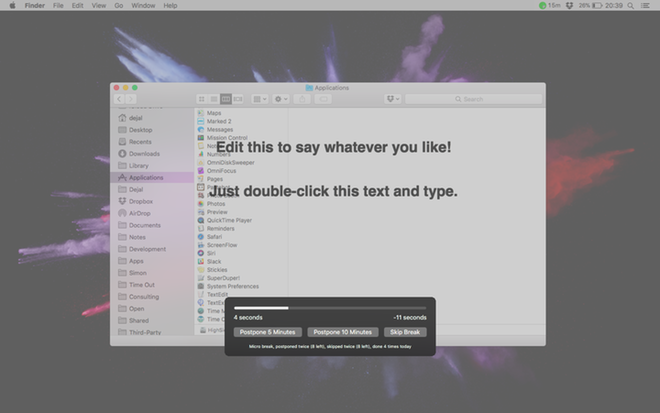
Time Out comes with two kinds of breaks: a "Normal" break, typically for 10 minutes every hour, so you can move about and relax, plus a "Micro" break: a very brief pause of typically 15 seconds every 15 minutes, so you can remember not to tense up too much for long periods. You can change, disable or remove either kind of break if desired, and add new kinds of breaks, e.g. fixed lunch or afternoon breaks.
You can configure how long each kind of break lasts, and how long between breaks, and the breaks can be set to count backwards when you take a natural break, e.g. when you go away from your computer.
When a break starts, the screen slowly dims, and a break theme appears. When the break is complete, it fades out again. Version 2 includes several break themes to choose from. The themes use web standards like HTML, CSS, and JavaScript, and can be local web apps or remote websites. So if you're comfortable editing web sites, you could edit the existing themes, or make your own. Or check out the Time Out Extras page for contributions from others.
While in a break, a progress bar shows how long till it is over, and optional buttons are available to postpone or skip the break if you can't be interrupted right then.
If you wish, you can have Time Out perform various actions before, during or after a break. For example, display a notification, speak some text, play a sound, and even run an Automator workflow or AppleScript. So you can have it notify you shortly before the break is due, then pause Music and play a short soothing piece of music or repeating sound at the start of a break, then fade it out and resume Music when the break is over. Some useful scripts are provided built-in, plus updates and user-submitted ones available on the Time Out Extras page.
Time Out can optionally track breaks and/or app usage via the Activity feature. Get a feel for how busy you are via a chart of breaks you've taken, apps you've used, and time away from the Mac. Zoom in to see more detail, or out for the big picture.
Common questions about this deal
Time Out on BundleHunt includes a license key and instant download access. The license is obtained directly from the developer and activates the latest version of the software.
After purchasing Time Out through BundleHunt, your license key and download link will be available immediately in your account under "Downloads & Licenses". You can access them anytime.
You will receive the developer's most up-to-date version of Time Out, fully activated and ready for immediate use.