Loading...
Version 3.1
Official license · Direct from developer
Developer
Geenensave them to any folder you specify or the clipboard. Simple Screenshot is easily accessible in the menubar
Check out the features of Simple Screenshot. IT is there to help you take screenshots on your Mac without the need to learn key combinations. It works on any Mac that has MacOS Mojave or newer, is available in 11 languages and makes taking screenshots a breeze from the menubar!
Always there for you in the menubar
Capture your screen effortlessly with Simple Screenshot. It integrates right into the menubar of your Mac and is within reach at all times. It supports dark mode, Apple Silicon processors and any MacOS version from Mojave and higher.
Customize screenshot settings
Adjust your screenshot experience to fit your needs. Change the default folder where the screenshots are saved to, change the image output types and change the bevahiour while taking screenshots.
Take different types of screenshots
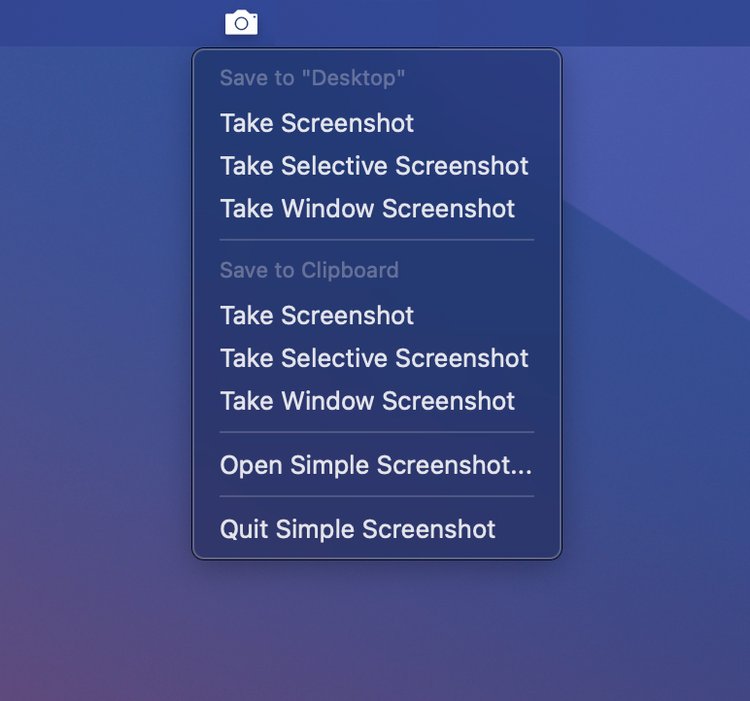
Simple Screenshot integrates perfectly with your Mac and gives multiple options to take screenshots. Take screenshots of all screens (or just the main screen), a selective screenshot or capture an entire window.
Save them automatically to a folder that you specify, or save them to the clipboard.
Customize your experience
Use Simple Screenshot to change the location where screenshots are saved to, change the output type and much more!
Common questions about this deal
Simple Screenshot on BundleHunt includes a license key and instant download access. The license is obtained directly from the developer and activates the latest version of the software.
After purchasing Simple Screenshot through BundleHunt, your license key and download link will be available immediately in your account under "Downloads & Licenses". You can access them anytime.
You will receive the developer's most up-to-date version of Simple Screenshot, fully activated and ready for immediate use.