Loading...

Official license · Direct from developer
Version 3.13
Official license · Direct from developer
Developer
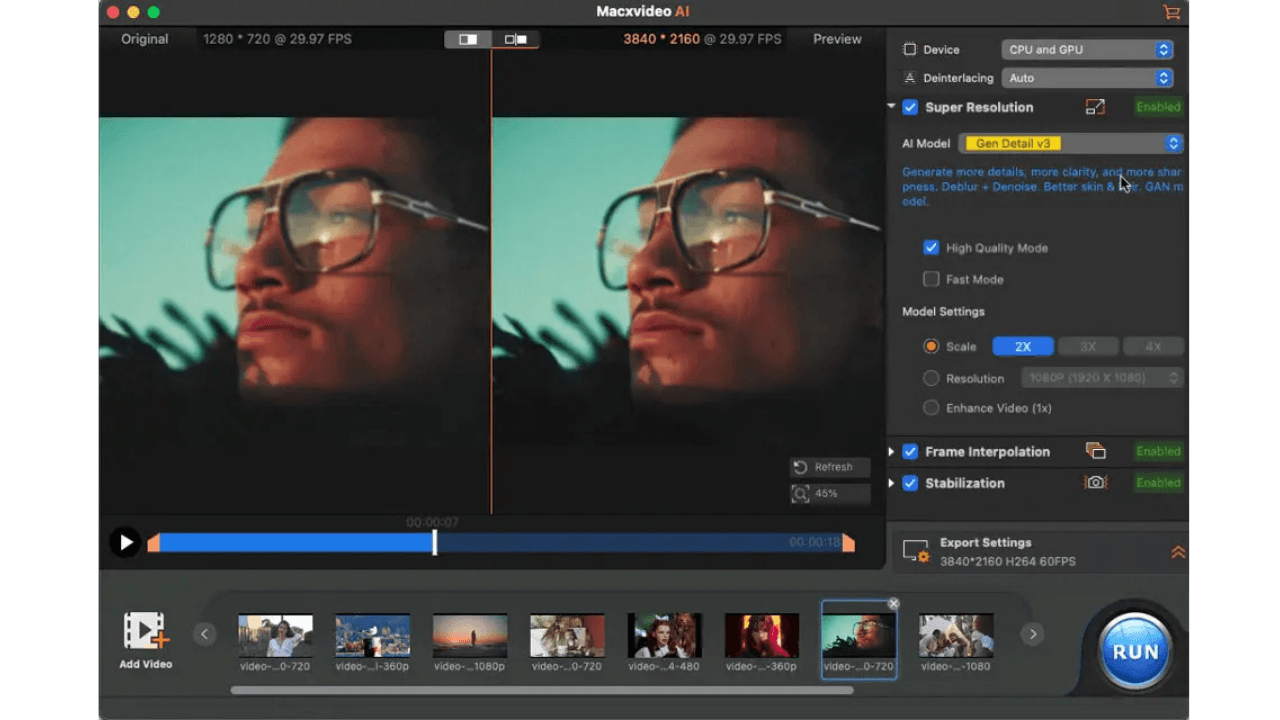
Digiarty SoftwareMacxvideo AI combines powerful AI enhancement with 20+ pro-grade tools—enhance clarity and detail, remove blur and noise, upscale to 4K/8K, convert, compress, record, and edit videos—all powered by full GPU acceleration.
Enhance video quality by intelligently upscaling footage up to 4X its original size, with support for resolutions as high as 4K. Preserve fine details while eliminating noise and blur, resulting in clearer, sharper visuals for a truly immersive viewing experience with advanced AI models.
Enhance video fluidity or create stunning slow-motion effects. Generate realistic intermediate frames, seamlessly converting low frame rates (24/30fps) to 60/120fps, or even up to 480fps, without distortion.
Eliminate shakes, jitters, and wobbles from your videos—perfect for footage from GoPros, drones, HD cameras, or smartphones.
AI Image Enhancer
Enhance low-quality and low-resolution AI art, photos, and images. Denoise, deblur, upscale, and add intricate details. Effortlessly enlarge images to 4K, 8K, or even 10K. Restore old, damaged photos to vibrant 4K quality. Enhance facial details like hair, skin, eyes, and lips, while reviving scratched or stained images. Colorize black-and-white photos.
Video/Audio Format Converter
Selectively or batch convert video, audio & folder from 370+ inputs to video/audio/photo in 420+outputs, ranging from general video, audio, 3D, to 4K footages and many more.For any platform & any devices. GPU-accelerated,47x real-time fast!
Video Compressor
Batch compress large 4K/8K files from GBs to MBs, reducing sizes by up to 90%. Customize compression settings to preferred size, adjust format, codec, GOP length, bitrate, resolution, etc.
Extract vocals from songs to create karaoke versions, keep instrumentals for background music, or isolate clean acapella vocals for remixes, covers, and voiceover projects. Remove background noise from both audio and video files.
Screen & Audio Recorder
Capture full screen, custom screen, webcam, PIP, and audio. Remove background, add text, highlight areas, and apply voiceovers.
Video Editor
Remove noise from video, convert video to GIF, fix fisheye distortion, add watermarks to video, build M3U8 playlists, sync audio/video, adjust audio volume, brightness, contrast, hue, gamma, etc.
Common questions about this deal
Macxvideo AI on BundleHunt includes a license key and instant download access. The license is obtained directly from the developer and activates the latest version of the software.
After purchasing Macxvideo AI through BundleHunt, your license key and download link will be available immediately in your account under "Downloads & Licenses". You can access them anytime.
You will receive the developer's most up-to-date version of Macxvideo AI, fully activated and ready for immediate use.