Loading...
Official license · Direct from developer
Version 4.7.1
Official license · Direct from developer
Developer
MaBaSoftApplication Wizard provides fast access to your applications, documents, folders, and disks. It lets you swiftly open, quit, and make applications active and turn single application mode on to reduce screen clutter. With Application Wizard you can also browse volumes and favorite folders to easily open enclosed items, eject and mount disks, and rapidly access recent documents and contacts. Finally, Application Wizard lets you preview images, music, movies, and documents and view file properties and metadata.
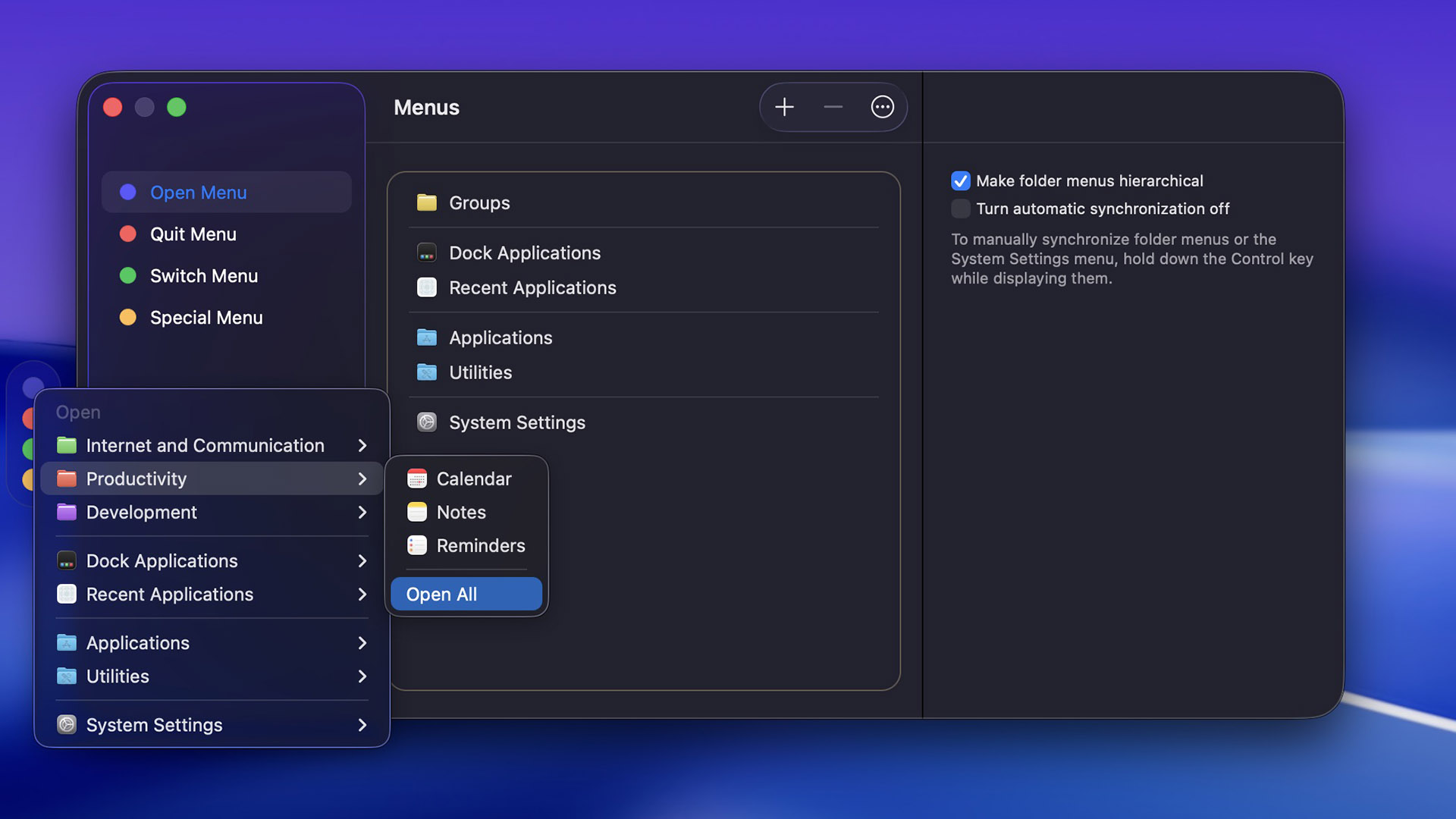
Application Wizard’s four menus (Open, Quit, Switch, and Special) can be quickly accessed through a small translucent panel discreetly located along the screen side, which you can also hide and automatically show just when you need it. Alternatively, menus can be displayed from the menu bar or using customizable keyboard shortcuts.
Application Wizard’s Open menu lets you quickly open favorite applications or groups of related applications, recent applications, and applications in your Applications and Utilities folder. In addition to that, the Open menu allows you to open System Settings panes, run AppleScripts, and, on Apple Silicon Macs, open Universal applications using Rosetta.
Quitting applications can’t be easier: with Application Wizard you can quit single applications, groups of applications, or all running applications with a single click. The Quit menu lets you also quit automatically terminated applications and background processes, see which applications are running using Rosetta, and allows you to force applications to quit.
Application Wizard’s Switch menu lets you switch between applications, quickly reopen automatically terminated applications, and show or hide single or groups of applications. If you regularly work with many open documents, the Switch menu lets you also show application windows, so that you can bring specific windows to the front when switching between applications. Finally, with the Switch menu you can turn on single application mode to reduce screen clutter.
Application Wizard’s Special menu lets you browse volumes and frequently used folders to quickly open enclosed items. It lets you preview documents and easily access recent folders and files, package contents, and contacts. But that’s not all. With the Special menu you can also eject and mount disks, monitor system memory usage, quit and launch the Finder, and lock your screen when you are away from your computer.
Application Wizard lets you show previews in the Special menu so that you can quickly display information about files and preview images, music, movies, and documents. Previews let you also open documents with specific applications, show files in the Finder, and move or copy them. Finally, with previews you can share files, easily view metadata, and display images and PDF files as slideshows.
Application Wizard lets you define keyboard shortcuts so that you can quickly accomplish frequent tasks by pressing keys on your keyboard. You can for instance use keyboard shortcuts to quit all running applications, or switch back to the previous application, or turn single application mode on and off.
Common questions about this deal
Application Wizard on BundleHunt includes a license key and instant download access. The license is obtained directly from the developer and activates the latest version of the software.
After purchasing Application Wizard through BundleHunt, your license key and download link will be available immediately in your account under "Downloads & Licenses". You can access them anytime.
You will receive the developer's most up-to-date version of Application Wizard, fully activated and ready for immediate use.